Use this step by step guide to join a league and make bookings for your league rounds.
First let’s get your league package purchased and setup you and your team member in the 24/7 Golf league:
- You should already have a 24/7 Golf account. If not use the form on this page to create your 24/7 Golf account.
- A 24/7 Golf account is required to purchase your league package and make your league round bookings.
- Be sure you have the Trackman Golf app installed. You can find details about the Trackman Golf app and link to download the app
HERE
- Purchase the League package for the location you will play your league rounds at.
- You will need to login to your 24/7 Golf account to make the purchase. You can purchase the appropriate league package HERE
- You will need to login to your 24/7 Golf account to make the purchase. You can purchase the appropriate league package HERE
- Join the league you would like to play.
- COMING SOON – Link to join the Spring League.
- Follow this How-To video to setup your team and add your playing partner to your team.

Now you are ready to start playing your league rounds, Awesome let the fun begin.
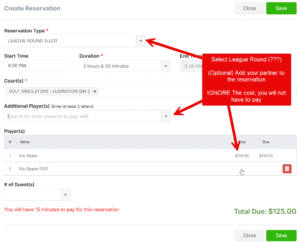
- When making a booking be sure to choose Reservation type “League Round”
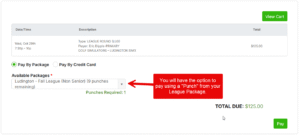
- On the pay screen you will be able to use 1 of your punches to pay for the league round. Your league package gives you 9 punches. 1 punch to play a handicap round if needed and a 8 more punches for the 8 league rounds.
- When making a booking be sure to choose Reservation type “League Round”