
How to Reserve a Bay
1.) If you have not created a 24/7 Golf account, create your account using the form below.
2.) Choose a Location.
3.) Click the “Reserve” link for the date and time you would like to make a reservation.
(Only one person needs to make the reservation.)
*Our facilities do not have staff on site, but we do have directions for first-time players at each bay. If you need additional assistance, you may call 616-350-9482.
- Create your account using the form below OR from the 24-7 Golf mobile app.
- Download the 24-7 Golf mobile app
- Login to the app using your credentials and ENJOY!!
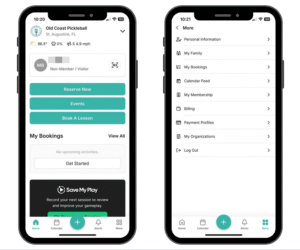
If you are having any challenges with the mobile version of our website PLEASE download our 24-7 Golf mobile app.
Reservations the easy way!! Download the 24-7 Golf mobile application.
Create your account using the form below OR Download the app and create your account from the 24-7 Golf mobile app.
Apple app
Android app
Login to the app using your credentials and ENJOY!!
Full instructions for using the 24-7 Golf mobile app powered by CourtReserve can be found here
Golf Simulators
- Weekdays – $35 / hour 12am to 5pm Mon – Fri.
- Evenings – $50.00 / hour 5pm to 12 am Mon -Thur.
- Weekends – $50.00 / hour 5pm Fri – Sun 12am
Pickleball
- Grand Rapids Location: $30.00 per hour for the whole court, weekdays & weekends.
- Ludington offers special memberships and pricing for pickleball. Please check HERE for full details.
When you book you will receive a confirmation email which will contain your unlock code to the door.
*Important – Please confirm that you received the confirmation email and code before heading to the facility.